New US customers: Starlink adds $100 account credit after two months subscribed when you order through a referral link.$100 credit for new US customers.How it works →
Independent · not affiliated with SpaceXRules from Starlink’s own pages · oldest check
How to use a Starlink referral link and get the $100, step by step
Most lost credits are lost on order day. Do the checks, follow the steps in order, and you’ll know before you pay that the referral is on your order.
Rules checked Against Starlink’s own pages. How we check
In brief
Open an existing customer’s referral link in a web browser, enter your US address and pick a plan in that same tab, and look for “Referral Code Applied” next to Checkout before you pay. Nothing comes off at checkout: the $100 arrives later as account credit.
What should you check before you open a referral link?
As of , you qualify for the $100 only if you have never held a Starlink subscription[2], your service address and the referrer’s are in the same country (for this site, the US)[2], and the kit and subscription are bought directly on starlink.com, not from a store, an unauthorized reseller or a private seller[2]. Check the five points below too: a slip on order day can’t be fixed later.
Your price.Starlink’s instruction for seeing your price is to enter your address on starlink.com and click “Order Now”[3]. Busy areas can carry a one-time demand surcharge at purchase or activation, set by the address and plan[4], up to about $1,500[5]. The $100 is the same at any price; how many bills it covers isn’t.
The sky.Starlink says it needs a clear view of the sky to stay connected as satellites move overhead, and that a tree branch, pole or roof may interrupt service[6]. A kit that goes back earns nothing.
Buy or rent.It’s unconfirmed whether renting the kit still earns the reward: the terms require that the new customer “must purchase a Starlink Kit and subscription directly from www.starlink.com”, and Starlink has never said if a rental qualifies unverified[2]. If your order page offers only a rental, wait.
A card that keeps working.Starlink counts the two cycles by monthly service invoices actually paid[2], so a failed payment can push the credit back (our reading).
The return clock.A kit bought on starlink.com and sent back undamaged inside the 30 days after the Payment Due Date is refunded in full, first month’s fee included[7], but a returned kit earns no credit.
Should I wait for a holiday sale?Starlink.com’s US home, Residential, Roam and Referrals pages showed no holiday or Black Friday promotion when we last checked[14]. Any change gets a dated note on our news page.
How do you order through a referral link, step by step?
As of , ordering through a referral link takes eight steps: confirm you qualify, open the link in a web browser, see the green banner, enter your address and plan in that same tab, find “Referral Code Applied” before paying, pay the normal total, keep a high-speed plan for two full billing cycles, then watch a later bill for the $100. Steps 3 and 5 are shown in the screenshots below.
Before ordering
Check you qualify
Never had Starlink at any address, a US service address, ordering as a person on a Residential or Roam plan, and keeping it. The eligibility check takes a minute.
Order day
Open the referral link in a web browser
Use the browser on the device you’ll order on, not a messaging app’s viewer. Starlink hasn’t said whether a referral opened in a browser survives when the order is completed in the Starlink app unverified[1], so finish on starlink.com.
Order day
Look for the green banner
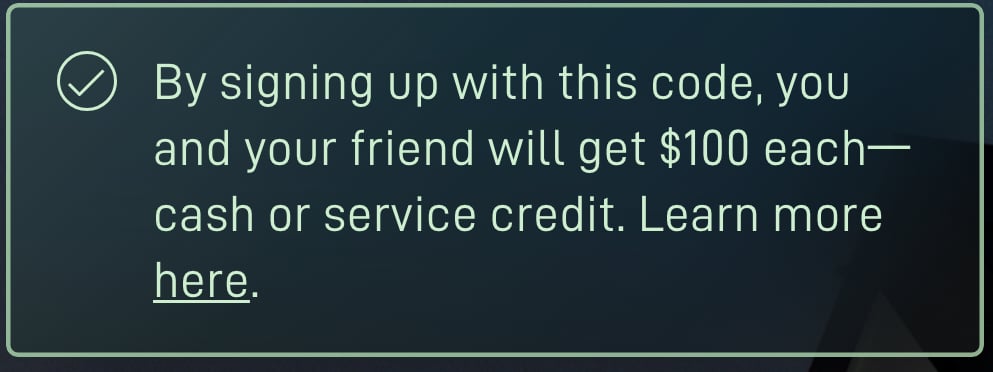
On Oct 30, 2026, a working referral link showed “By signing up with this code, you and your friend will get $100 each—cash or service credit.” in a green banner on the landing page and under “Referral Code Applied” on the order page[8]. No banner? Check you opened the whole link, then open it again.
Order day
Enter your address and pick a plan, in the same tab
Starlink shows the plans and prices for your address, with any demand surcharge or area pricing. Those come from the address, not the referral.
Order day
Find “Referral Code Applied” before you pay
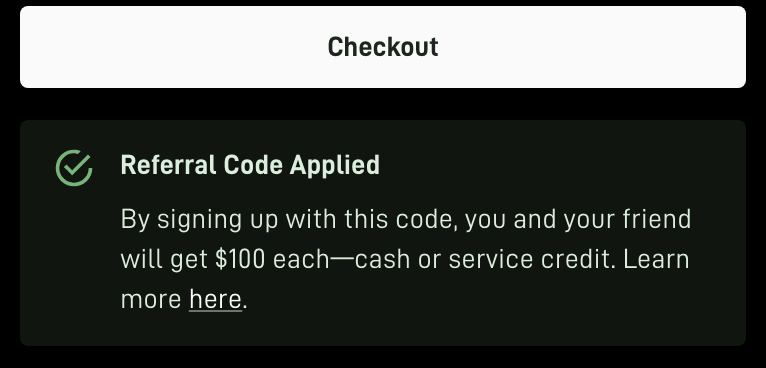
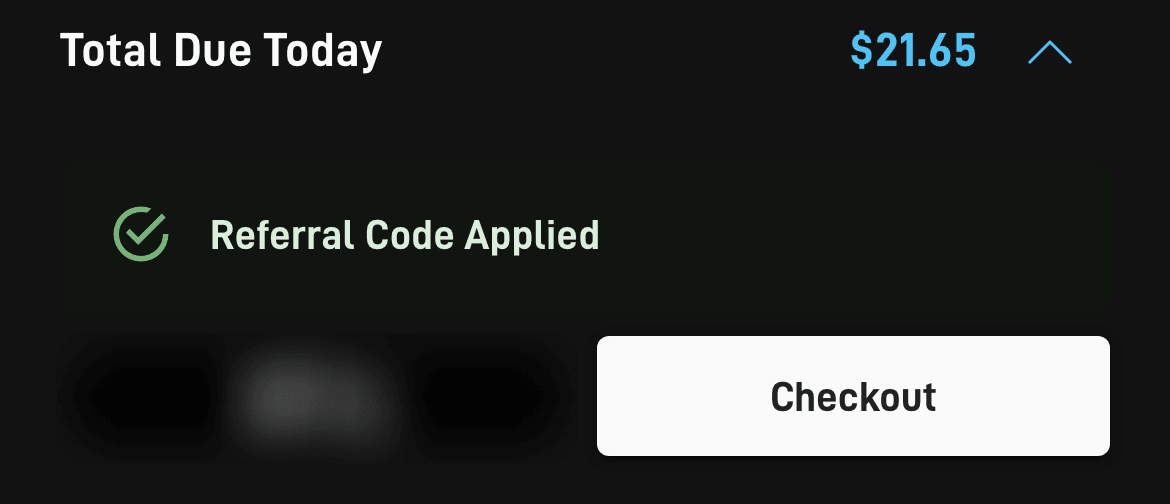
The order page adds a green panel reading “Referral Code Applied” beside the Checkout button (beneath it on desktop, directly above it on phones) once the referral is attached[9] (our reading). Screenshot it. “Referral Code Not Applied”, or no panel? Stop: an order placed without the link can’t have a referral attached afterwards[1]. The panel shows the link is attached, not that the order qualifies (each panel explained).
A green banner on the page the link opens Link working
On a computerScreenshot of starlink.com, taken . The first sign the link worked. It doesn’t say when the $100 arrives: after two months subscribed. Full size screenshotOn a phone (emulated)Screenshot of starlink.com, taken . On a phone the banner sits under the headline. Full size screenshot
What it means: starlink.com read a referral code from the link. A bad code or no code showed no banner (our check, Oct 30, 2026).
What to do: Stay in this tab: enter your address and pick a plan here.
“Referral Code Applied” next to the Checkout button Referral attached
On a computerScreenshot of starlink.com, taken . On a computer the panel sits right under Checkout. Full size screenshotOn a phone (emulated)Screenshot of starlink.com, taken . On a phone it sits just above the Checkout button. Apple Pay button blurred by us. Full size screenshot
What it means: The referral is on this order. It shows the link attached, not that the order qualifies: Starlink decides that later.
What to do: Take a screenshot of it before you pay.
Order day
Pay the normal total
You pay the kit (or a rental’s activation), shipping and tax now, with no referral deduction. Card declined? Retry in the same tab, then check the panel again. What order day costs.
Months 1 and 2
Keep a high-speed plan for two full billing cycles
Your first monthly charge comes on your Payment Due Date: per the order summary, month one is billed on activation day, or a week after delivery if that comes first[9]. Then Starlink’s terms require that your service stays active and in good standing, without a break, through two complete monthly billing cycles[2], and both cycles have to be on a high-speed plan, and months in Standby Mode don’t count[2].
Standby doesn’t count toward the $100
The $100 comes only if your service stays active and in good standing, without a break, through two complete monthly billing cycles[2], and Starlink’s terms count only time continuously subscribing to a high-speed service plan (excludes Standby Mode). So switching a new kit to Standby can cost you the $100, and the person whose link you used loses theirs too (our reading of the terms).
The trap: Standby right after delivery. Some buyers, often of a Mini on a Roam plan, switch a new kit to Standby as soon as it ships or is set up, to pay less until a trip. Reported In one r/Starlink thread (Aug 28, 2026), a buyer about to order a Mini through a referral link asked about pausing it until needed, and a reply described switching to Standby as soon as the kit shipped. In another (Oct 10, 2026), a reply pointed out that with a referral, both sides lose the reward. Standby has its own monthly fee, too ($10/mo press report[11]).
Standby isn’t offered on every kit: Standby Mode is not available on V5 hardware[12], and Standby is unavailable for select rental customers[12].
Who should wait: anyone who’ll pause or cancel between seasons or trips. Starlink’s terms expect that you genuinely use Starlink and intend to keep it; Starlink measures referred customers’ retention against the US average[2].
From bill 2
Watch for the $100 on a later bill
Starlink’s terms say the $100 is credited to your second monthly subscription invoice[2]; its help center says it comes once you’ve had service for two months[1], 60 days after activation at the earliest, subject to your account settings and an identity check[1]. The first credits under the Oct 7, 2026 terms can’t appear before Dec 6, 2026, so neither reading has been seen in practice yet. A credit is applied to the next bill your account generates, or to the one after if a bill is already pending when it lands[10]. Your dates.
Why does the referral need the same browser tab?
In our reading of the starlink.com page code (Oct 29, 2026), the referral is held only in the browser tab the link opened, so closing that tab drops it; Starlink doesn’t publish this as a rule[9]. So the safe habit is simple: open the link when you’re ready, and finish the order in the tab it opened. Three things can swap or lose it:
Starlink’s help pages.A few of Starlink’s help articles link to starlink.com carrying some other customer’s referral code, and opening one in your order tab swaps out the referral you arrived with (our reading of the starlink.com page code)[9].
A second referral link opened in the same tab replaces the first (our reading).
Another browser, device or app. Open the link again where you’ll order. On an iPhone, a starlink.com referral link should open in the browser rather than the Starlink app, because starlink.com’s app-link file lists only /app/ paths (our reading)[13].
Only have a code (RC-…), not the link?
There’s no box to type it into, but you can rebuild the link: in your browser’s address bar (not a search box), type starlink.com, a question mark, the word “referral”, an equals sign and the code, with no spaces: starlink.com?referral=RC-•••. Then do steps 3 to 5 as usual. Codes that start “RC-DF-” come from Starlink’s newer share links; we haven’t tested typing one, so ask the sender for the whole link.
How to tell a real link: a working Starlink referral link is starlink.com with a “referral” parameter set to an RC code; opening one shows a green banner and, on the order page, “Referral Code Applied” (our Oct 30, 2026 check)[9]. A shortened link or QR code is fine only if it lands on starlink.com and the banner shows. A “% off” code from a coupon site isn’t a Starlink code at all (savings that aren’t from Starlink).
Mistakes that lose the credit
Mistakes that lose the $100, and what to do instead
Mistake
Do this instead
Closing the tab and ordering later from a bookmark
Open the link again and redo the address and plan steps.
Opening the link on a phone and ordering on a laptop
Order on the device and browser you opened it on.
Reading Starlink’s help pages, or a second referral link, in your order tab
Either can replace your referral (why). Keep the order tab for the order.
Letting phone support or Starlink’s AI agent finish the order
Finish it yourself on starlink.com: the terms say the new customer must purchase a Starlink Kit and subscription directly from www.starlink.com (Terms §3.1(d)). Reported In one r/Starlink thread (Sep 9, 2026), an order the AI phone agent finished didn’t get the referral.
Buying the kit at a store, from a reseller or second-hand
Only starlink.com orders through the link count. Where it counts.
After you order: the date finder works out your bill dates, and how billing works shows where the $100 appears on a bill. It comes as account credit unless you choose otherwise, taken off your next Starlink invoice[1]; cash is an option on some accounts (credit or cash).
Order-day questions
Can I add a referral after I’ve ordered?
No. Starlink’s help center says an order placed without the link can’t have a referral attached afterwards[1], which is why the panel check comes before you pay.
Can I order by phone or in the Starlink app?
Not by phone: the terms say the new customer must purchase a Starlink Kit and subscription directly from www.starlink.com (Terms §3.1(d)), and that you order the kit using the existing customer's unique referral link; no other method counts[2]. In the app, it’s open: Starlink hasn’t said whether a referral opened in a browser survives when the order is completed in the Starlink app unverified[1]. Finish the order yourself on starlink.com, in the browser tab the link opened.
Does a rented kit get the $100?
It’s unconfirmed whether renting the kit still earns the reward: the terms require that the new customer “must purchase a Starlink Kit and subscription directly from www.starlink.com”, and Starlink has never said if a rental qualifies unverified[2]. In our Oct 30, 2026 check, a rental order still showed “Referral Code Applied”, but that panel shows the link is attached, not that the order qualifies: the decision on whether an order qualifies is Starlink’s alone, and it’s final[2]. If your order page offers the kit only as a rental, waiting for Starlink’s answer is the safer choice.