New US customers: Starlink adds $100 account credit after two months subscribed when you order through a referral link.$100 credit for new US customers.How it works →
Independent · not affiliated with SpaceXRules from Starlink’s own pages · oldest check
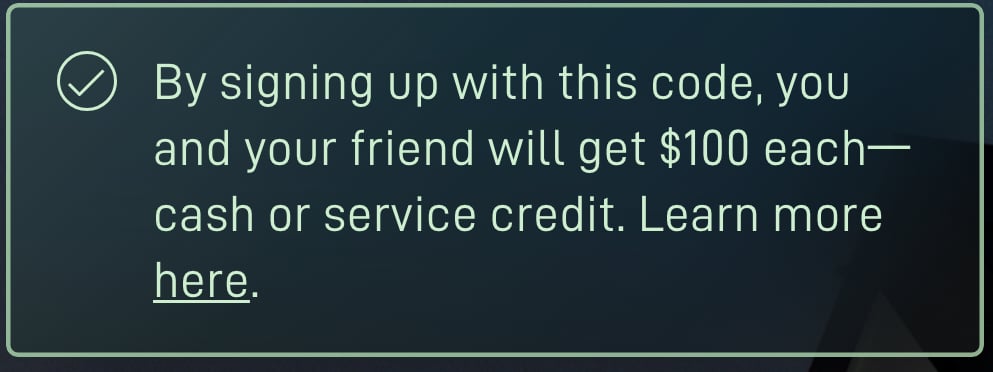
If you just clicked a referral link, starlink.com opened in a new tab. Before you pay there, look for the green banner and “Referral Code Applied”, shown here in dated screenshots from a computer and a phone.
Rules checked Against Starlink’s own pages. How we check
A green banner on the page the link opens Link working
On a computerScreenshot of starlink.com, taken . The first sign the link worked. It doesn’t say when the $100 arrives: after two months subscribed. Full size screenshotOn a phone (emulated)Screenshot of starlink.com, taken . On a phone the banner sits under the headline. Full size screenshot
What it means: starlink.com read a referral code from the link. A bad code or no code showed no banner (our check, Oct 30, 2026).
What to do: Stay in this tab: enter your address and pick a plan here.
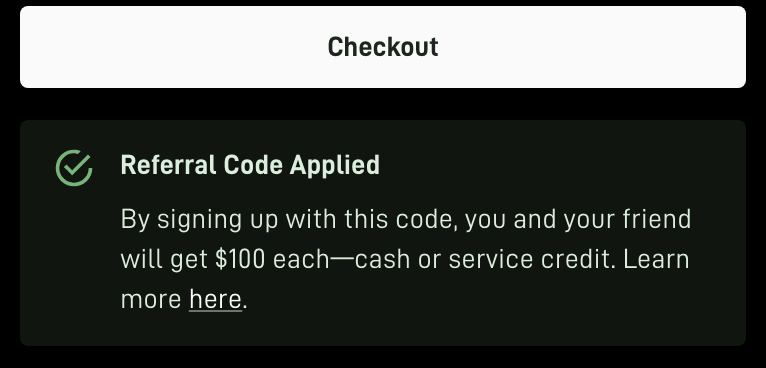
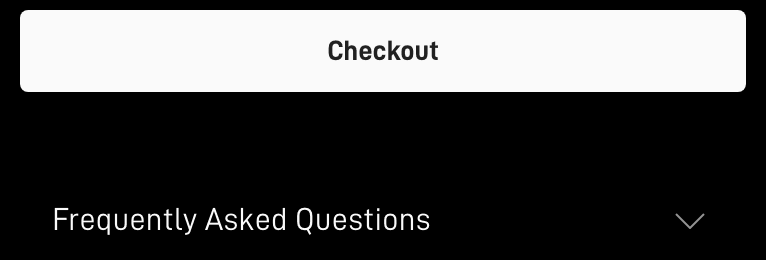
“Referral Code Applied” next to the Checkout button Referral attached
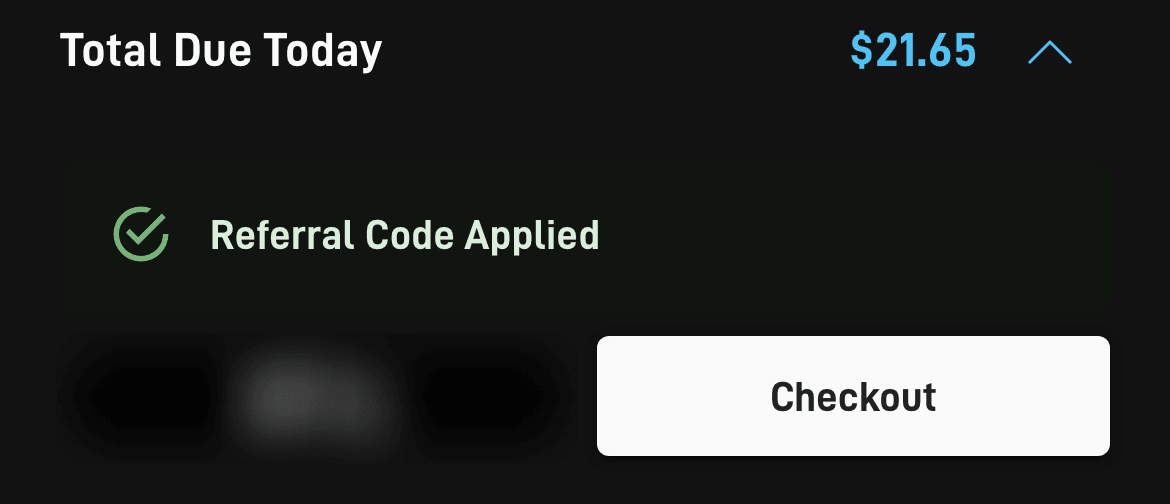
On a computerScreenshot of starlink.com, taken . On a computer the panel sits right under Checkout. Full size screenshotOn a phone (emulated)Screenshot of starlink.com, taken . On a phone it sits just above the Checkout button. Apple Pay button blurred by us. Full size screenshot
What it means: The referral is on this order. It shows the link attached, not that the order qualifies: Starlink decides that later.
What to do: Take a screenshot of it before you pay.
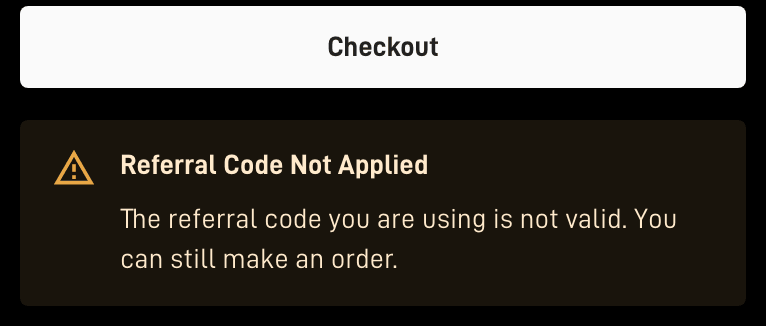
If it says “Referral Code Not Applied” Not attached
On a computerScreenshot of starlink.com, taken . Made with a deliberately invalid test code: the order would go through without the reward. Full size screenshot
What it means: The code isn’t valid, or doesn’t apply to this order type. The order would still go through, without the reward.
What to do: Don’t pay yet. Check you opened the whole link, then open it again and redo the address and plan steps in that tab.
If there’s no panel at all No referral
On a computerScreenshot of starlink.com, taken . No panel under Checkout means this tab holds no referral. Full size screenshot
What it means: This tab holds no referral, for example because starlink.com was opened without the link or in another tab.
What to do: Don’t pay yet: a referral can’t be added later. Open the link again and enter your address and plan in the tab it opens.
Phone screenshots marked “emulated” were taken in a computer browser set up to act as a phone, not on a real phone.
Five checks, in order
Look for the green banner on the page the link opens
On Oct 30, 2026, a working referral link showed “By signing up with this code, you and your friend will get $100 each—cash or service credit.” in a green banner on the landing page and under “Referral Code Applied” on the order page[2]. Stay in that tab for everything that follows: in our reading of the starlink.com page code (Oct 29, 2026), the referral is held only in the browser tab the link opened, so closing that tab drops it; Starlink doesn’t publish this as a rule[3].
Enter your US service address and pick a plan, in that tab
starlink.com checks it can serve the address and lists the plans and prices for it. The prices come from your address, not from the referral.
Find the panel next to the Checkout button
The order page adds a green panel reading “Referral Code Applied” beside the Checkout button (beneath it on desktop, directly above it on phones) once the referral is attached[3] (our reading). You don’t need to pay to see it. Amber “Referral Code Not Applied”, or no panel at all? Stop, and see what to do.
Check the order summary: no $100 line, and that’s normal
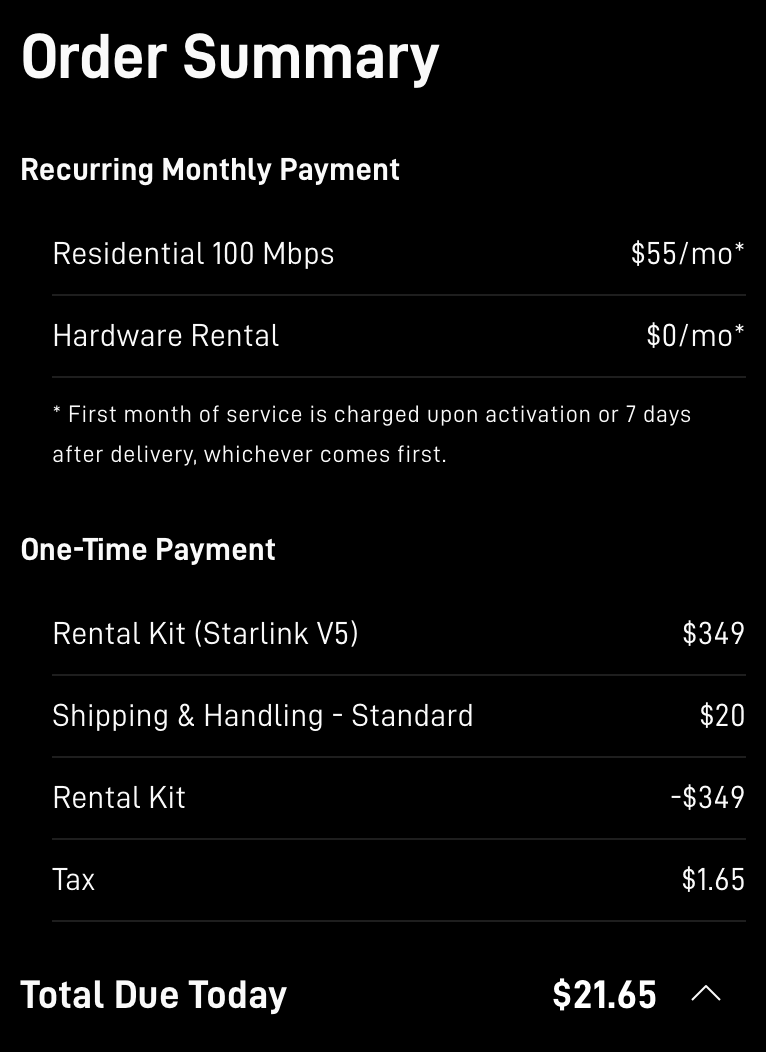
The first month is paid in full and the kit activated as usual; the checkout total has no referral deduction[1]. What you pay today is the kit (or a rental’s activation), shipping and tax; the $100 comes later, on a monthly bill (which one).
123
Monthly charges start later: at activation or 7 days after delivery, whichever comes first.
Paid today: at this address on Oct 30, 2026 the rental kit was offset to $0, leaving shipping and tax.
Total due today has no $100 line. The reward comes later, as service credit by default: after two months subscribed (help center), on the second monthly invoice (terms).
Screenshot of starlink.com, taken . Taken with the referral applied: nothing comes off at checkout, and the first month is charged later. Full size screenshotText in this screenshot
Order Summary
Recurring Monthly Payment
Residential 100 Mbps
$55/mo*
Hardware Rental
$0/mo*
* First month of service is charged upon activation or 7 days after delivery, whichever comes first.
One-Time Payment
Rental Kit (Starlink V5)
$349
Shipping & Handling - Standard
$20
Rental Kit
-$349
Tax
$1.65
Total Due Today
$21.65
Illustration Nothing comes off at checkout: the total due today has no $100 line, and the reward comes later, as service credit by default. Screenshot: starlink.com, taken Oct 30, 2026 at one public address · notes: ours, from Starlink’s order page text, help center and terms, read Oct 30–Nov 3, 2026
Take a screenshot of the panel before you pay
Keep it with your order email. If you ever need to ask Starlink about the referral, they show the link was on the order.
Your first two billing cycles: what keeps the $100
Starlink’s terms require that your service stays active and in good standing, without a break, through two complete monthly billing cycles[4]. They also expect that you genuinely use Starlink and intend to keep it; Starlink measures referred customers’ retention against the US average[4]. In those two cycles:
Pay every bill.Starlink counts the two cycles by monthly service invoices actually paid[4], so a payment that fails can push the $100 back Our reading.
Change your card only inside your account. Sign in on starlink.com or in the Starlink app yourself instead of following a payment link from a message. Starlink says a real WhatsApp payment-link message comes only from +1 555 821 7702; payment links otherwise come only by email to your account address or from Starlink Support[6].
No Standby, cancellation or return.Both cycles have to be on a high-speed plan, and months in Standby Mode don’t count[4]. A cancellation ends the subscription the two cycles are counted on, and so does a return, even one inside Starlink’s return window (a kit bought on starlink.com and sent back undamaged inside the 30 days after the Payment Due Date is refunded in full, first month’s fee included[7]): either one means no $100.
Check the cost before you change plans or move.A mid-cycle plan change can bring prorated charges for the old and/or new plan[8], and credits don't pay immediate charges or pro-rated costs, such as a reactivation, a plan change or a shop order[9]. A move can cost too: surcharges from an address move, Roam-to-Residential switch, resuming service or a new line in a high-demand area can't be waived[10].
Renting the kit?Rental-kit customers can't pause service[11], and a rental service line can't be transferred to another person or place[11]. It’s unconfirmed whether renting the kit still earns the reward: the terms require that the new customer “must purchase a Starlink Kit and subscription directly from www.starlink.com”, and Starlink has never said if a rental qualifies unverified[4].
Stay on one Starlink account.A second Starlink account can be created by accident (another email address or a browser autofill)[12], so sign in with the email you ordered with. Don’t open a second account to order again or to get another reward: Starlink can cancel or take back a reward, even after it's issued, for fraud, abuse or a terms violation[4].
Keep your proof. Save the “Referral Code Applied” screenshot, if you took one before paying, and the order email. They show the link was used, and an order placed without the link can’t have a referral attached afterwards[1].
My Payment Due Date: · Bill 2: · Bill 3: · Bill 4:
Today: the kit (or a rental’s activation), shipping and tax, with nothing off for the referral (step 4).
Bill 1 comes later, in full, on your Payment Due Date: per the order summary, month one is billed on activation day, or a week after delivery if that comes first[3].
A later bill: Starlink’s terms say the $100 is credited to your second monthly subscription invoice[4]; its help center says it comes once you’ve had service for two months[1], 60 days after activation at the earliest, subject to your account settings and an identity check[1]. The first credits under the current terms can’t appear before Dec 6, 2026, so treat both readings as possible. Once it lands, a credit is applied to the next bill your account generates, or to the one after if a bill is already pending when it lands[13].
Order day Kit or rental activation, shipping and tax. Nothing comes off at checkout: no $100 line
Bill 1, the Payment Due Date: the first month, paid in full
Bill 2 may carry the $100 Starlink’s terms
Bill 3 may carry the $100 Help center, our reading
Bill 4, if the credit lands while bill 3 is already pending
What Starlink does
Counts paid invoice 1 of 2
Counts paid invoice 2 of 2
Day 60: the help center’s earliest day to add the $100
Puts the credit on the next invoice, or the one after when one is already pending
Two readings of when the $100 lands
Starlink’s terms
Starlink’s help center
Starlink’s words
applied on their second monthly subscription invoice
after they have subscribed for two months, as soon as 60 days after they activate
Which bill (our reading)
Bill 2
Bill 3, the first after day 60 (), or a later one
Date
Until about Dec 6, 2026, nobody ordering under these terms can have reached day 60, so both readings stay open.
Illustration Starlink’s terms say the $100 comes on the second monthly invoice (bill 2); its help center says after two months, as soon as 60 days after activation (bill 3, or 4). Dates: example dates and Starlink’s billing rules (Terms of Service, help center), read Nov 3, 2026 · our arithmetic, in UTC like Starlink’s billing
If it says “Referral Code Not Applied”, or there’s no panel
When the referral can’t be used, an amber “Referral Code Not Applied” panel appears instead, for instance because the code is invalid or doesn’t fit that order type; the order can still be placed, just without the reward[3]. No panel at all means this tab holds no referral. Either way, don’t pay yet if the $100 matters to you: an order placed without the link can’t have a referral attached afterwards[1].
Make sure you’re in the tab the referral link opened, and that you opened the whole link.
Help pages opened in the same tab can swap the referral: a few of Starlink’s help articles link to starlink.com carrying some other customer’s referral code, and opening one in your order tab swaps out the referral you arrived with (our reading of the starlink.com page code)[3]. Read them in another tab.
Check you’ve never had Starlink and that you’re ordering a Residential or Roam plan (who qualifies).
Open the link again in this browser, go back through the address and plan steps, and look for the panel again.
The panel shows the link is attached, not that the order qualifies
The decision on whether an order qualifies is Starlink’s alone, and it’s final[4]. The panel can show on orders that won’t earn the $100. Reported In one r/Starlink thread (Oct 4, 2025), a buyer activating a store-bought kit saw “Referral Code Applied” all the way through checkout and took it to mean the referral had worked; a reply quoted Starlink’s help center at the time, which said retail kits get no credit even when a referral link is used. Starlink’s help center still says only sign-ups made at starlink.com earn a reward; a kit from a retailer, a reseller or an account transfer is excluded[1].
Renting the kit?It’s unconfirmed whether renting the kit still earns the reward: the terms require that the new customer “must purchase a Starlink Kit and subscription directly from www.starlink.com”, and Starlink has never said if a rental qualifies unverified[4] (Terms §3.1(d)). The panel showing on a rental order doesn’t settle it. Every condition: who qualifies.
After you pay: where to look
Where you can look while you wait
The credit table, on your Billing page
Once the credit is on your account, it’s listed here. Starlink: Credits can be viewed in your account by going to starlink.com/account/billing. The credit table is below the invoice table and will show the available balance and the total amount of the credit.There is also a summary of available credits below the account balance box in the upper left corner of the page.
Preview Next Invoice
Starlink: To know if a promotion has been applied, you can log in to you Starlink account, go to the billing tab, and click 'preview invoice'.The preview updates each day and includes all charges due as of that day, including extra data from the current cycle or a recent service-plan change. Treat a preview as a guide and check the invoice itself too (our reading).
Your Referrals page
Track successful referrals and rewards under Referrals on the web or in the Starlink app.Our reading A new customer’s account can show an information banner about an upcoming referral reward; Starlink’s server supplies its wording, which we haven’t seen (our reading of the starlink.com page code).
The referrer’s Referrals page
The person whose link you used sees the referral there: on this site’s button, that’s the site owner (what the site owner sees). Our reading Starlink’s Referrals page labels referrals Pending, Processing, Rewarded, Complete, Failed or Ineligible, and can show an “Expected” date (our reading of the starlink.com page code). If a referral shows as Ineligible, hover over its status to see why. Neither of you can add or change a referral: Starlink decides.
Illustration Four places to look after you order: the credit table and Preview Next Invoice in your account’s billing, your own Referrals page, and the Referrals page of the person whose link you used. Paths: Starlink’s billing and referral help, read Nov 3, 2026 · Referrals page labels and alert: our reading of starlink.com’s code, as of Nov 3, 2026 · icons ours, not Starlink’s screens
Why some answers still say “30 days”
Two of Starlink’s older help articles are gone, but copies still circulate with timings that no longer apply. Starlink has removed its older referral help articles (“How do I use a referral link?” and “Additional FAQs - Billing”); both returned “not found” on Nov 2, 2026, and the live article is “Does Starlink have a referral program?”[1]. A site or an AI answer that says the credit comes 30 days after activation, or that billing starts at activation or 30 days after the kit ships, with no 7-day date, is most likely repeating one of them (our reading).
“How do I use a referral link?”
Removed What it said, in the Internet Archive’s copy:
“The credit will be applied 30-days after you activate your account.”
What Starlink says now: its terms say the $100 is credited to your second monthly subscription invoice[4]; its help center says once you’ve had service for two months[1], 60 days after activation at the earliest, subject to your account settings and an identity check[1]. Nobody ordering under the current terms reaches day 60 before Dec 6, 2026, so neither reading is confirmed yet. The live article adds that an order placed without the link can’t have a referral attached afterwards[1].
“Additional FAQs - Billing”
Removed What it said, in the Internet Archive’s copy:
“Your first bill will occur either on activation or 30 days after your Starlink ships, whichever comes first.”
What Starlink says now:per the order summary, month one is billed on activation day, or a week after delivery if that comes first[3]. Its Terms of Service keep the 30 days only as a fallback: your first charge comes on the earliest of: the day you activate, 7 days after delivery, or 30 days after shipping if there's no delivery date (the 'Payment Due Date')[7]. Since about Nov 3, 2026, its installer article has listed 30 days after shipping as a third date, without that condition: billing starts on whichever comes first: the day you power on and connect the kit, a week after delivery, or 30 days after it ships, whatever the installation date[18].
Still unsure? Questions, answered
I closed the Starlink tab. Did I lose it?
Only that tab’s copy: in our reading of the starlink.com page code (Oct 29, 2026), the referral is held only in the browser tab the link opened, so closing that tab drops it; Starlink doesn’t publish this as a rule[3]. Open the link again in the same browser, go back through the address and plan steps, and check for the panel before you pay.
Do I have to type a code anywhere?
No: the order flow has no field for typing a referral code, as far as we found[3] (our reading). The referral rides in the link.
Why doesn’t the order total show $100 off?
That’s how Starlink’s referral works: the first month is paid in full and the kit activated as usual; the checkout total has no referral deduction[1]. Starlink’s terms say the $100 is credited to your second monthly subscription invoice[4]; its help center says it comes once you’ve had service for two months[1], 60 days after activation at the earliest, subject to your account settings and an identity check[1].
Does the green panel guarantee the $100?
No. It shows the referral is attached to the order. The decision on whether an order qualifies is Starlink’s alone, and it’s final[4]. The two billing cycles still have to happen too: Starlink’s terms require that your service stays active and in good standing, without a break, through two complete monthly billing cycles[4].
Can I finish the order in the app?
Starlink hasn’t said whether a referral opened in a browser survives when the order is completed in the Starlink app unverified[1]. Finish on starlink.com, in the browser tab the link opened.