Credit missing
$100 referral credit not showing? Find the cause
A few questions show whether the $100 simply isn’t due yet, or which of Starlink’s rules got in the way, and what you can still do.
Find the cause
Question 1Older terms may apply to this order
Until Oct 7, 2026, a new customer got one free month of service on bill 2 instead of $100. Which terms cover orders placed just before the change isn’t published. Check bill 2 for a free-month credit, then your Referrals page.
“For Pending Referrals as of the date of this notice, the terms of unmodified Referral Terms shall apply during the notice period.”
That can’t be two months yet
Anyone who ordered on or after Oct 7, 2026 reaches day 60 no earlier than Dec 6, 2026. Check the first-bill date (the Payment Due Date) in your account and put it in the date finder. Starlink’s terms say the $100 is applied on the second monthly invoice; its help center says after two months, as soon as 60 days after activation. Until about Dec 6, 2026, nobody under the current terms can have reached day 60, so the second invoice and any later bill are both possible.
It may just be early
Starlink’s terms say the $100 is applied on your second monthly invoice; its help center says after two months, as soon as 60 days after activation, and a credit that lands while a bill is pending goes on the next one. Until about Dec 6, 2026, nobody under the current terms can have reached day 60, so the second invoice and any later bill are both possible. A full-price bill 2 doesn’t mean something went wrong.
Check the three places first
Sign in on starlink.com in a web browser and open Billing. Preview Next Invoice shows your next bill with any credit already applied and updates daily; “Available Service Credits” sits under the account balance; and the credit table under your invoices lists each credit with its available balance.
Reports from September 2026 describe a preview showing a discount that the final charge didn’t apply, so check the invoice line too.
It’s waiting for the next bill
Starlink applies a credit to the next bill that appears in your account; if a bill was already pending when the credit landed, it goes on the following one. A credit listed as available is on your account and comes off a coming bill.
Cash needs Stripe set up first
Starlink pays cash through Stripe. “Finish onboarding” on your Referrals page means that setup isn’t complete, and cash can’t be paid until it is. Without Stripe, Starlink issues the reward as service credit, so check your credits too. Its terms allow cash up to 30 days after a referral matures; that line is written for referrers, and applying it to you is our reading.
“If you see "Finish onboarding," your Stripe setup isn't complete yet, and you can't receive cash until it is.”
The referral wasn’t on the order
“Referral Code Not Applied” next to the Checkout button means Starlink didn’t attach the referral to this order: its order page says the order still goes through, but with no reward. Support can tell you why; plan on no $100 for this order.
When the referral can’t be used, an amber “Referral Code Not Applied” panel appears instead, for instance because the code is invalid or doesn’t fit that order type; the order can still be placed, just without the reward (our reading of starlink.com’s order page).
“If they ordered without your link, used someone else's link, or bought from a retailer or marketplace store, the referral won't appear and can't be added later.”
The order went through without a referral
With nothing about a referral next to the Checkout button, the referral wasn’t attached to the order, and Starlink says a referral can’t be added to an order later. Support can confirm what’s on your order.
“If they ordered without your link, used someone else's link, or bought from a retailer or marketplace store, the referral won't appear and can't be added later.”
Store, reseller and second-hand kits don’t count
Starlink’s terms say the kit and subscription must be bought directly on starlink.com. Signing up through any other channel, such as a store, a reseller or a private transfer, isn’t eligible for the reward.
“The Referred Subscriber must purchase a Starlink Kit and subscription directly from www.starlink.com. Signing up through any other channel is not eligible for a Reward, including, but not limited to, retail stores, unauthorized resellers, or a private transfer from a third party.”
App orders are unconfirmed
Starlink says to use the link to buy on starlink.com. No Starlink page says whether an order finished in the app keeps a referral opened in a browser. Ask support whether a referral is recorded on your order.
Phone and AI-agent orders aren’t the channel the terms name
Starlink’s terms say the kit and subscription must be bought directly from www.starlink.com, and that signing up through any other channel isn’t eligible. One report from September 2026, under the earlier terms: Starlink’s AI phone agent finished an order and said the referral would still apply; it didn’t, and support said the link had to be used when ordering on starlink.com.
“The Referred Subscriber must purchase a Starlink Kit and subscription directly from www.starlink.com. Signing up through any other channel is not eligible for a Reward, including, but not limited to, retail stores, unauthorized resellers, or a private transfer from a third party.”
Returning customers aren’t eligible
The reward is for people who have never been a Starlink subscriber. A past subscription at any address, even a short one, rules it out.
“The Referred Subscriber is not, and has never been, a Starlink subscriber.”
Check for a second account
Starlink says a second account can be created without you noticing, for example when an order is placed with a different email address or one your browser filled in. If your order sits on another account, the referral may be there too (our reading). Ask support to check.
“A separate account can be created without you noticing, for example if an order was placed with a different email address or one filled in by your browser.”
The two cycles weren’t completed
The reward needs two full monthly billing cycles on a high-speed plan. Standby Mode doesn’t count, and cancelling or returning the kit ends the subscription the cycles are counted on.
“The Referred Subscriber completes the Minimum Subscription Duration by continuously subscribing to a high-speed service plan (excludes Standby Mode) for the period specified in Schedule A below.”
A plan change may have reset something
Starlink doesn’t say a plan change cancels a referral, as long as you stay on an eligible high-speed plan. Check your credits, then ask support to confirm the referral is still recorded.
The two cycles count paid invoices
Starlink counts the two billing cycles by the monthly service invoices you’ve paid, so a failed or late payment can push the reward back (our reading). Starlink retries a failed payment about every 2–3 days for up to 24 days. Settle the balance in your Starlink account, then check again after the next bill.
“The minimum duration is based on the number of monthly service invoices paid by the Referred Subscriber.”
Everything checks out: ask Starlink
You ordered the way Starlink’s terms ask, and it’s been at least two months. Until about Dec 6, 2026, nobody under the current terms can have reached day 60, so the second invoice and any later bill are both possible. If your bill 4 hasn’t come yet, the $100 can still land there; if it has, Starlink asks you to open a support ticket when a credit should have been on your bill.
Reach Starlink support
- A ticket:
On starlink.com: Sign in → My Account → Messages → New Ticket
. - Chat: Starlink’s chat support starts with an AI (“Grok-powered”) assistant; you can also create a ticket. Ask for a ticket if the assistant can’t help.
- Phone:
Call (24/7): 888-GO-STARLINK (888-467-8275)
. Starlink never charges for customer support.
Anyone asking you to pay to reach support isn’t Starlink.
“If you believe a credit should have been included in your most recent bill, or the credit amount is incorrect, please create a support ticket and provide details about the issue.”
Copy a message for Starlink support
Both dates are optional. The message is put together on this page and nothing is sent: paste it into a ticket in your Starlink account, and fill in anything still in brackets.
Used a referral button on this site? Then the person whose link you used is the site owner. They can see your referral’s status, an expected date and, if Starlink marks it ineligible, a reason (our reading of Starlink’s Referrals page). They can’t add or fix a referral: only Starlink can.
This site has no contact channel, so nobody here can look anything up for you. Starlink support can.
In brief
First check the timing. Starlink’s terms say the $100 is credited to your second monthly subscription invoice[2]; its help center says it comes once you’ve had service for two months[1], 60 days after activation at the earliest, subject to your account settings and an identity check[1]. Until about Dec 6, 2026, nobody under the current terms can have reached day 60, so the second invoice and any later bill are both possible.
Ordered on or after Oct 7, 2026[3]? Then you can’t be past day 60 before Dec 6, 2026.
What you can check today
The $100 comes after two full billing cycles, but you don’t have to wait to see where your referral stands. Five places to look:
- Your Referrals page. Starlink says referrals and rewards are followed under Referrals, on starlink.com or in the app, so sign in and open it. A new customer’s account can show an information banner about an upcoming referral reward; Starlink’s server supplies its wording, which we haven’t seen (our reading of the starlink.com page code).
The person whose link you used. Your sign-up shows on their Referrals page, so ask them what it says. Starlink’s Referrals page labels referrals Pending, Processing, Rewarded, Complete, Failed or Ineligible, and can show an “Expected” date (our reading of the starlink.com page code), and when a referral shows as Ineligible, hovering over the status shows the reason (on the referrer's Referrals page).
Used a referral button on this site? Then the person whose link you used is the site owner. They can see your referral’s status, an expected date and, if Starlink marks it ineligible, a reason (our reading of Starlink’s Referrals page; what the site owner sees). They can’t add or fix a referral: only Starlink can.
This site has no contact channel, so nobody here can look anything up for you. Starlink support can.
- Your screenshot from checkout. If you took one before paying, check it: the order page adds a green panel reading “Referral Code Applied” beside the Checkout button (beneath it on desktop, directly above it on phones) once the referral is attached (our reading). The panel shows the link was attached, not that the order qualifies: the decision on whether an order qualifies is Starlink’s alone, and it’s final.
- From bill 2 on: your bill preview and credits. Before each bill, open Billing on starlink.com: Preview Next Invoice updates daily and shows all charges due so far, and the Billing page also shows a summary of available credits under the account balance box. Starlink’s billing page lists credits under “Available Service Credits” (or hardware or general credits) with the amount “applicable to service”, and keeps coupons in a separate table with “Uses Remaining” (our reading of starlink.com’s interface text). Why from bill 2: Starlink’s terms say the $100 is credited to your second monthly subscription invoice; its help center says it comes once you’ve had service for two months, 60 days after activation at the earliest, subject to your account settings and an identity check. Orders under the current terms reach day 60 from Dec 6, 2026 on, so neither reading has been tested yet.
- Your dates, in your calendar. The date finder works out your bill dates under both readings from your first-bill date and makes a calendar file. Nothing you type leaves your browser.
Where this comes from: Does Starlink have a referral program? · support article on starlink.com, read Nov 3, 2026; Referral Program Terms, US · starlink.com legal doc DOC-1882-84808-83, read Nov 3, 2026; How does the monthly service billing cycle work? · support article on starlink.com, read Nov 3, 2026; Billing - Credits · support article on starlink.com, read Nov 3, 2026; our reading of starlink.com’s order pages and page code, our read-only check with no order placed, Nov 3, 2026.
Steps 1, 2 and 4 in Starlink’s own words:
Where you can look while you wait
Once the credit is on your account, it’s listed here. Starlink: Credits can be viewed in your account by going to starlink.com/account/billing. The credit table is below the invoice table and will show the available balance and the total amount of the credit.
There is also a summary of available credits below the account balance box in the upper left corner of the page.
Starlink: To know if a promotion has been applied, you can log in to you Starlink account, go to the billing tab, and click 'preview invoice'.
The preview updates each day and includes all charges due as of that day, including extra data from the current cycle or a recent service-plan change.
Treat a preview as a guide and check the invoice itself too (our reading).
Track successful referrals and rewards under Referrals on the web or in the Starlink app.
Our reading A new customer’s account can show an information banner about an upcoming referral reward; Starlink’s server supplies its wording, which we haven’t seen (our reading of the starlink.com page code).
The person whose link you used sees the referral there: on this site’s button, that’s the site owner (what the site owner sees). Our reading Starlink’s Referrals page labels referrals Pending, Processing, Rewarded, Complete, Failed or Ineligible, and can show an “Expected” date (our reading of the starlink.com page code). If a referral shows as Ineligible, hover over its status to see why.
Neither of you can add or change a referral: Starlink decides.
What the order page showed
Our reading of the order page, for all three cases below: the order page adds a green panel reading “Referral Code Applied” beside the Checkout button (beneath it on desktop, directly above it on phones) once the referral is attached[5]. Before you paid, that spot could instead show one of two other things, and both mean an order without the $100:

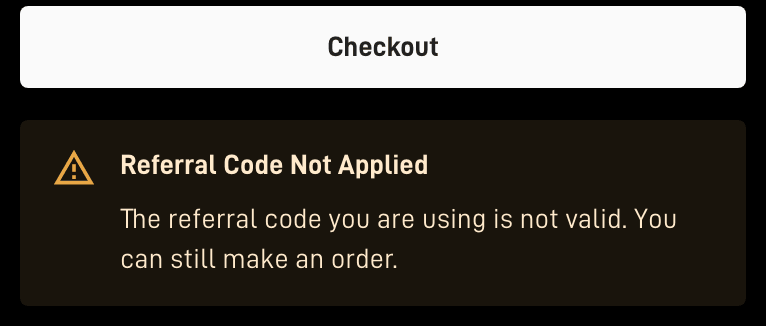
When the referral can’t be used, an amber “Referral Code Not Applied” panel appears instead, for instance because the code is invalid or doesn’t fit that order type; the order can still be placed, just without the reward[5].

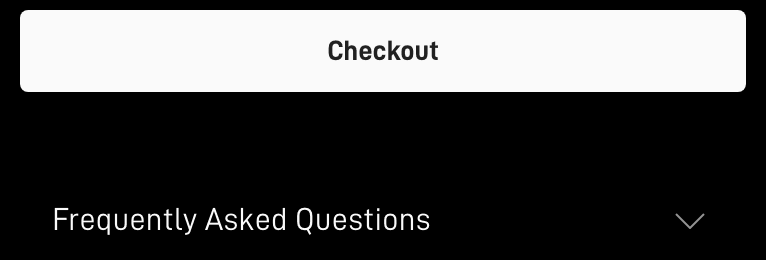
No panel at all: the tab you ordered in held no referral, because in our reading of the starlink.com page code (Oct 29, 2026), the referral is held only in the browser tab the link opened, so closing that tab drops it; Starlink doesn’t publish this as a rule[5].
Ordered without the link?
Starlink’s help center is plain about it:
“If they ordered without your link, used someone else's link, or bought from a retailer or marketplace store, the referral won't appear and can't be added later.”
Where that leaves your order:
- The order status. An order can be changed or cancelled only while it shows Pending, often only 1–3 hours[6].
- A second order. The terms require that you have never held a Starlink subscription[2], and Starlink hasn’t said whether an order cancelled while it was Pending counts against that Unverified. So this guide doesn’t suggest cancelling and ordering again.
- The 30-day return. A kit bought on starlink.com and sent back undamaged inside the 30 days after the Payment Due Date is refunded in full, first month’s fee included[7]. To return a kit you have to cancel the subscription[8], so a returned kit earns no $100.
- Support. You can ask, but support may still say no: the referral can’t be added afterwards, and the decision on whether an order qualifies is Starlink’s alone, and it’s final[2].
Contacting Starlink
Only Starlink can check or fix a referral. When a credit is missing from a bill, Starlink asks for a ticket:
“If you believe a credit should have been included in your most recent bill, or the credit amount is incorrect, please create a support ticket and provide details about the issue.”
- A ticket: On starlink.com, a support ticket starts from Sign in → My Account → Messages → New Ticket[9].
- Chat: Starlink’s chat support starts with an AI (“Grok-powered”) assistant; you can also create a ticket[9]. If the assistant can’t help with the referral, ask it to open a ticket.
- Phone: US/Canada phone support: 888-GO-STARLINK (888-467-8275), 24/7[9].
- No fee: Starlink never charges for support[10]. Anyone who asks you to pay, or to buy a gift card, to reach support isn’t Starlink.
Starlink lists these routes on its Contact Starlink Customer Support · support article on starlink.com page. What to put in the ticket: your order date, your first bill date, whether you saw “Referral Code Applied”, and that you ordered on starlink.com through a referral link. The cause finder’s last answer puts the message together for you, on this page.
Payment links in messages
Starlink says a real WhatsApp payment-link message comes only from +1 555 821 7702; payment links otherwise come only by email to your account address or from Starlink Support[11]. When in doubt, sign in on starlink.com yourself and pay from Billing.
Every possible cause
The same answers as the cause finder, in one list.
It may just be early
Starlink’s terms say the $100 is applied on your second monthly invoice; its help center says after two months, as soon as 60 days after activation, and a credit that lands while a bill is pending goes on the next one. Until about Dec 6, 2026, nobody under the current terms can have reached day 60, so the second invoice and any later bill are both possible. A full-price bill 2 doesn’t mean something went wrong. Work out your dates
That can’t be two months yet
Anyone who ordered on or after Oct 7, 2026 reaches day 60 no earlier than Dec 6, 2026. Check the first-bill date (the Payment Due Date) in your account and put it in the date finder. Starlink’s terms say the $100 is applied on the second monthly invoice; its help center says after two months, as soon as 60 days after activation. Until about Dec 6, 2026, nobody under the current terms can have reached day 60, so the second invoice and any later bill are both possible. Work out your dates
Check the three places first
Sign in on starlink.com in a web browser and open Billing. Preview Next Invoice shows your next bill with any credit already applied and updates daily; “Available Service Credits” sits under the account balance; and the credit table under your invoices lists each credit with its available balance. Where the $100 shows up
It’s waiting for the next bill
Starlink applies a credit to the next bill that appears in your account; if a bill was already pending when the credit landed, it goes on the following one. A credit listed as available is on your account and comes off a coming bill. How credits are applied
Cash needs Stripe set up first
Starlink pays cash through Stripe. “Finish onboarding” on your Referrals page means that setup isn’t complete, and cash can’t be paid until it is. Without Stripe, Starlink issues the reward as service credit, so check your credits too. Its terms allow cash up to 30 days after a referral matures; that line is written for referrers, and applying it to you is our reading. Credit or cash
Older terms may apply to this order
Until Oct 7, 2026, a new customer got one free month of service on bill 2 instead of $100. Which terms cover orders placed just before the change isn’t published. Check bill 2 for a free-month credit, then your Referrals page. What changed on Oct 7, 2026
The referral wasn’t on the order
“Referral Code Not Applied” next to the Checkout button means Starlink didn’t attach the referral to this order: its order page says the order still goes through, but with no reward. Support can tell you why; plan on no $100 for this order. What the panel means
The order went through without a referral
With nothing about a referral next to the Checkout button, the referral wasn’t attached to the order, and Starlink says a referral can’t be added to an order later. Support can confirm what’s on your order. What the order page shows
Store, reseller and second-hand kits don’t count
Starlink’s terms say the kit and subscription must be bought directly on starlink.com. Signing up through any other channel, such as a store, a reseller or a private transfer, isn’t eligible for the reward. Where the $100 counts
App orders are unconfirmed
Starlink says to use the link to buy on starlink.com. No Starlink page says whether an order finished in the app keeps a referral opened in a browser. Ask support whether a referral is recorded on your order. Where the $100 counts
Phone and AI-agent orders aren’t the channel the terms name
Starlink’s terms say the kit and subscription must be bought directly from www.starlink.com, and that signing up through any other channel isn’t eligible. One report from September 2026, under the earlier terms: Starlink’s AI phone agent finished an order and said the referral would still apply; it didn’t, and support said the link had to be used when ordering on starlink.com. Where the $100 counts
Returning customers aren’t eligible
The reward is for people who have never been a Starlink subscriber. A past subscription at any address, even a short one, rules it out. Who qualifies
Check for a second account
Starlink says a second account can be created without you noticing, for example when an order is placed with a different email address or one your browser filled in. If your order sits on another account, the referral may be there too (our reading). Ask support to check. Contacting Starlink
The two cycles weren’t completed
The reward needs two full monthly billing cycles on a high-speed plan. Standby Mode doesn’t count, and cancelling or returning the kit ends the subscription the cycles are counted on. What keeps the $100
A plan change may have reset something
Starlink doesn’t say a plan change cancels a referral, as long as you stay on an eligible high-speed plan. Check your credits, then ask support to confirm the referral is still recorded. What keeps the $100
The two cycles count paid invoices
Starlink counts the two billing cycles by the monthly service invoices you’ve paid, so a failed or late payment can push the reward back (our reading). Starlink retries a failed payment about every 2–3 days for up to 24 days. Settle the balance in your Starlink account, then check again after the next bill. The two-cycle rule
Everything checks out: ask Starlink
You ordered the way Starlink’s terms ask, and it’s been at least two months. Until about Dec 6, 2026, nobody under the current terms can have reached day 60, so the second invoice and any later bill are both possible. If your bill 4 hasn’t come yet, the $100 can still land there; if it has, Starlink asks you to open a support ticket when a credit should have been on your bill. Contacting Starlink
Why some answers still say “30 days”
Two of Starlink’s older help articles are gone, but copies still circulate with timings that no longer apply. Starlink has removed its older referral help articles (“How do I use a referral link?” and “Additional FAQs - Billing”); both returned “not found” on Nov 2, 2026, and the live article is “Does Starlink have a referral program?”[1]. A site or an AI answer that says the credit comes 30 days after activation, or that billing starts at activation or 30 days after the kit ships, with no 7-day date, is most likely repeating one of them (our reading).
“How do I use a referral link?”
Removed What it said, in the Internet Archive’s copy:
“The credit will be applied 30-days after you activate your account.”
What Starlink says now: its terms say the $100 is credited to your second monthly subscription invoice[2]; its help center says once you’ve had service for two months[1], 60 days after activation at the earliest, subject to your account settings and an identity check[1]. Nobody ordering under the current terms reaches day 60 before Dec 6, 2026, so neither reading is confirmed yet. The live article adds that an order placed without the link can’t have a referral attached afterwards[1].
“Additional FAQs - Billing”
Removed What it said, in the Internet Archive’s copy:
“Your first bill will occur either on activation or 30 days after your Starlink ships, whichever comes first.”
What Starlink says now: per the order summary, month one is billed on activation day, or a week after delivery if that comes first[5]. Its Terms of Service keep the 30 days only as a fallback: your first charge comes on the earliest of: the day you activate, 7 days after delivery, or 30 days after shipping if there's no delivery date (the 'Payment Due Date')[7]. Since about Nov 3, 2026, its installer article has listed 30 days after shipping as a third date, without that condition: billing starts on whichever comes first: the day you power on and connect the kit, a week after delivery, or 30 days after it ships, whatever the installation date[15].
Not two months yet? Work out your dates · The exact wording: Starlink’s rules, side by side
Still unsure? Questions, answered
It’s been 60 days and there’s no $100. Is something wrong?
Can support add a referral I forgot to use?
I chose cash. Where is it?
What should I send support?
Someone sent me a link to pay my Starlink bill. Is it real?
Can a failed payment hold up the $100?
Does Starlink charge for support?
Where these facts come from
- Does Starlink have a referral program? · support article on starlink.com Starlink
- Referral Program Terms, US · starlink.com legal doc DOC-1882-84808-83 Starlink
- Starlink legal documents for the US (list with publish dates) Starlink
- Billing - Credits · support article on starlink.com Starlink
- starlink.com’s order pages and page code, our read-only check with no order placed Starlink
- Order Overview · support article on starlink.com Starlink
- Starlink Terms of Service, US Starlink
- How do I return my Starlink kit? · support article on starlink.com Starlink
- Contact Starlink Customer Support · support article on starlink.com Starlink
- Customer support is never a paid service · support article on starlink.com Starlink
- Phishing or suspicious emails or texts claiming to be from Starlink · support article on starlink.com Starlink
- How does the monthly service billing cycle work? · support article on starlink.com Starlink
- How do I use a referral link? (Starlink help center, archived copy of Jun 11, 2025; the article now returns "not found") Starlink
- Additional FAQs - Billing (Starlink help center, archived copy of Jun 11, 2025; the article now returns "not found") Starlink
- Does Starlink provide installers? · support article on starlink.com Starlink
- Referral Program Terms, US, version published 2026-10-03 (replaced 2026-10-07) Starlink
- How do I know if a promotion has been applied? · support article on starlink.com Starlink
- Billing - Unknown Charges · support article on starlink.com Starlink
- Why did I receive a "Payment Failed" email? · support article on starlink.com Starlink
Where to next
- Find the bill your $100 lands onWhen the $100 credit shows upPut in your first-bill date to see bill 2, bill 3 and the earliest day the $100 can land.
- Monthly service, yes. Kit, shipping and surcharges, noWhat the $100 credit can and can’t pay forMonthly service charges, yes. Shop orders, reactivations, plan-change charges and surcharges, no.
- The rules, quoted, as of Nov 3, 2026Starlink’s referral rules, Terms and help center side by sideStarlink’s referral terms, clause by clause, from the new customer’s side, with the exact wording.