Billing, explained
How Starlink billing works: your billing date, first bills and where the $100 shows up
What Starlink charges and when, from the day you order to the bill the $100 referral credit lands on: your billing date, each line on your bill, payments, plan changes and refunds.
In brief
As of , Starlink bills a month at a time: each bill is due on the first day of its billing period (you pay in advance)[2]. Per the order summary, month one is billed on activation day, or a week after delivery if that comes first[3]; later bills come on the same day each month, the anniversary of the Payment Due Date[4]. Activate on the 29th, 30th or 31st and your billing date moves to the 28th[2]. One-time costs, such as the kit or a rental’s activation, shipping and tax, are paid with the order; in some high-demand areas, a one-time demand surcharge applies too. The $100 referral credit comes off a later monthly bill, never the order (which bill).
Your billing cycle: paid in advance, on the same day each month
Your billing cycle starts on the day the kit is first activated[2]. Setting it up late doesn’t hold it back: if you don't activate within 7 days of delivery, service activates automatically[2]. That first day is your Payment Due Date. Each billing cycle runs from there to the same day the next month (activate on the 29th, 30th or 31st and your billing date moves to the 28th[2]), and you pay for it at its start: each bill is due on the first day of its billing period (you pay in advance)[2].
One billing month, from billing date to billing date
One billing month
- Your billing date The month’s bill, paid in advance:
Payment is due on the first day of the billing period.
- Every day Preview Next Invoice updates:
The preview updates each day and includes all charges due as of that day, including extra data from the current cycle or a recent service-plan change.
- The evening before the next billing date (US time) The last moment for plan changes or cancelling:
Starlink subscriptions billing is tied to UTC time; changes must be made before 12:00 AM UTC on your billing day. Changes made after midnight will be delayed until the next billing day.
- Next billing date The next month’s bill, again in advance.
Where the $100 can land
- Bill 1 Paid in full: your first month.
- Bill 2 May carry the $100: Starlink’s terms say it’s
applied on their second monthly subscription invoice
Starlink’s terms - Bill 3 May carry it: the help center says
after they have subscribed for two months
,as soon as 60 days after they activate
Help center, our reading - Bill 4 If the credit lands while bill 3 is already pending:
applied to your following bill
Which reading Starlink follows can’t show before Dec 6, 2026, when the first orders under the current terms reach day 60.
| Time zone | The evening before |
|---|---|
| Eastern | 7:00 PM, or 8:00 PM in daylight saving time |
| Central | 6:00 PM, or 7:00 PM in daylight saving time |
| Mountain | 5:00 PM, or 6:00 PM in daylight saving time |
| Arizona (outside the Navajo Nation) | 5:00 PM all year |
| Pacific | 4:00 PM, or 5:00 PM in daylight saving time |
| Alaska | 3:00 PM, or 4:00 PM in daylight saving time |
| Hawaii | 2:00 PM all year |
Starlink’s own text Activate late in a month and the billing date moves: If you activate service on the 29th, 30th, or 31st, your billing date moves to the 28th.
Four things follow from it that catch people out:
- You can’t pick the date. Starlink’s billing article says billing date changes aren’t supported: your billing date follows the day you activate (activating on the 29th–31st moves it to the 28th)[2].
- Plan changes and cancellations are due the evening before. Billing runs on UTC time: changes must be made before 12:00 AM UTC on your billing day, which is the evening before in US time zones[6]. The table above has the time in each US time zone.
- A change in mid-cycle is prorated. A mid-cycle plan change can bring prorated charges for the old and/or new plan[7] (plan changes, below).
- The preview moves daily. Preview Next Invoice updates daily and shows all charges due so far[2], so look again the day before your billing date.
One-time costs, then monthly bills
Starlink isn’t a one-time payment. The kit (or a rental’s activation), shipping and tax are paid once, with the order: an online order is charged at checkout[2]. Service is a monthly plan after that: month-to-month with no long-term contract (some offers excepted)[10]. Two cases can cost more if you stop early. On Oct 30, 2026, the order page said cancelling or certain changes during the 12-month installment period make the rest of the Mini balance due at once[11]. And it’s still open whether US Residential kit rentals carry a 12-month commitment: one Starlink help article says they do, while the rent article and the Terms of Service don't mention one unverified[12].
What Starlink’s own order summary showed on one order, with the referral applied:
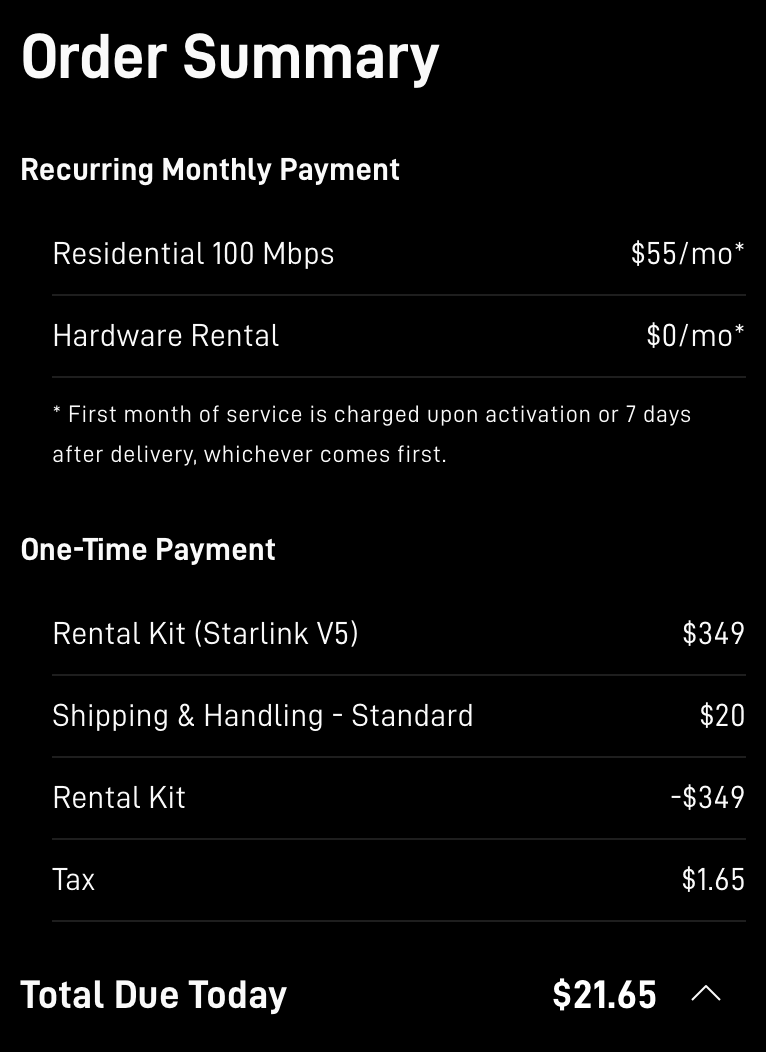
- Monthly charges start later: at activation or 7 days after delivery, whichever comes first.
- Paid today: at this address on Oct 30, 2026 the rental kit was offset to $0, leaving shipping and tax.
- Total due today has no $100 line. The reward comes later, as service credit by default: after two months subscribed (help center), on the second monthly invoice (terms).
Text in this screenshot
| Recurring Monthly Payment | |
|---|---|
| Residential 100 Mbps | $55/mo* |
| Hardware Rental | $0/mo* |
| * First month of service is charged upon activation or 7 days after delivery, whichever comes first. | |
| One-Time Payment | |
| Rental Kit (Starlink V5) | $349 |
| Shipping & Handling - Standard | $20 |
| Rental Kit | -$349 |
| Tax | $1.65 |
| Total Due Today | $21.65 |
When billing starts
- Order day: the one-time costs, at checkout.
- The first month: Starlink’s Terms of Service say your first charge comes on the earliest of: the day you activate, 7 days after delivery, or 30 days after shipping if there's no delivery date (the 'Payment Due Date')[4]. Per the order summary, month one is billed on activation day, or a week after delivery if that comes first[3]. Starlink’s installer article lists the same three dates without the Terms’ “if no delivery date is available”: billing starts on whichever comes first: the day you power on and connect the kit, a week after delivery, or 30 days after it ships, whatever the installation date[14]. For a rented kit, rental billing starts automatically on day 7 after delivery if you have not activated[15].
- An odd first amount: Starlink lists a new kit as a reason a bill can differ: the first bill is often prorated[16].
- A late kit: If billing is about to start and the kit still hasn't arrived 30 days after shipping, the trial is extended 30 days and a one-month service credit is added[2].
Can I buy now and set it up later? Only for a few days. Service starts on its own (if you don't activate within 7 days of delivery, service activates automatically[2]), and Starlink says it can't delay shipping timelines[17].
How to read your bill
Bills are only in your Starlink account (no paper bills)[4]: sign in on starlink.com and open Billing. Each charge carries a name from Starlink’s Invoice Description Glossary. The ones a new customer sees:
- “Account Unified Sign-Up Order” is a new customer's starlink.com purchase[18]. It’s paid when you order, and nothing comes off it for the referral.
- “Account Subscription” is the monthly service charge, paid in advance for the dates shown[18]. This is the bill the $100 comes off.
- “Partial Service Invoice” is the prorated difference when you upgrade mid-cycle[18] (plan changes).
- Busy areas can carry a one-time demand surcharge at purchase or activation, set by the address and plan[5]. Starlink’s glossary puts this demand surcharge at up to about $1,500[18] per residential service line.
Where the $100 shows: the invoice shows the credit as its own line item[19], and each invoice shows what was paid, how much credit was applied and what is left[20]. Between bills, your credits are listed at starlink.com/account/billing, in a credit table under the invoices, with the available balance and the total amount[9]; the Billing page also shows a summary of available credits under the account balance box[9].
The lines on a monthly bill, and where the $100 shows
Your first invoice is a different one: the “Account Unified Sign-Up Order” is the starlink.com purchase itself, and the $100 doesn’t come off it (our reading), because Starlink says Credits are only applied to monthly subscription charges.
The monthly bills after it carry these lines.
Example price Roam 100GB at Starlink’s US list price (Nov 3, 2026), on the first bill the credit reaches.
- “Account Subscription” $55.00. Starlink’s name for the monthly service charge:
It pays in advance for the service period shown by the start and end dates
. Starlink’s own words - The referral credit, a line of its own −$55.00. Starlink:
Your invoice will then have a line item that reflects $100 USD of credit has been applied to your invoiced total.
It never takes more than the bill’s total; the other $45 stays on your account for the next bill (our reading). Exact line wording not published - Taxes and fees. Starlink may add
taxes and other fees and surcharges required by law
; this example leaves them out. - Paid, credited, remaining: $0.00 left to pay on this bill. Starlink:
Invoices also show the total amount that has been paid, the total amount to which credits have been applied, and the total amount remaining.
Paying: methods, failed payments and card holds
Starlink takes most credit and debit cards, Apple Pay, Google Pay and PayPal[22]. US Residential accounts can pay by bank account (ACH direct debit)[22], and Klarna is listed for the United States[22]. No paper checks; some prepaid and debit cards get declined[22].
If a payment fails: A failed US payment is retried about every 2–3 days for up to 24 days; service continues meanwhile, then may be turned off[23]. It matters for the $100 too: Starlink counts the two cycles by monthly service invoices actually paid[8], so an unpaid bill doesn’t count toward the two cycles it waits for (our reading).
A charge you don’t recognize: Card authorizations are not charges and drop off in 3–7 days[20], and an extra processing fee on a Starlink payment comes from the bank or card issuer, not Starlink[24].
What hits your card, and when
Example price A Mini kit on Roam 100GB at Starlink’s US list prices (read Nov 3, 2026), before tax.
On your card
- Order day The kit, shipping and tax. note 1 Example: a Mini kit, $149.00, plus shipping (seen at $20 at one address on Oct 30, 2026) and tax.
- Activation, or 7 days after delivery The first month. note 2 Example: Roam 100GB, $55.00.
- Each Payment Due Date Each month after that, in advance. note 3 Example: $55.00.
- A later bill A smaller charge: the card pays only what’s left after the $100. note 4 Example: $0.00 on bill 3, then $10.00 on bill 4.
- Never No refund to your card: the $100 only ever comes off bills. note 5
- At checkout:
When you buy on starlink.com, your payment method is charged at checkout for that order.
First month of service is charged upon activation or 7 days after delivery, whichever comes first.
Payment is due on the first day of the billing period.
The credit card on file for the account will be charged the standard billing rate after the service credit has been applied.
Example: $55.00 − $55.00 on bill 3. This example follows the help center,after they have subscribed for two months
; Starlink’s terms say it isapplied on their second monthly subscription invoice
, which is bill 2.Credits are non-refundable, non-transferable, and will not be reimbursed if you discontinue service.
Cash, where your account offers it, goes to a bank through Stripe instead.
Not confirmed yet The name a Starlink charge carries on your card statement: we haven’t confirmed it with a dated statement. Match the amount and the date to an invoice in your account: Bills are provided to customers on a monthly basis only through the Starlink Customer Portal.
Changing plans in the middle of a cycle
A plan change can start NOW or on your billing DATE. Choose DATE to switch at the end of the paid period[25]. NOW works differently in each direction: a downgrade set to NOW starts immediately and the rest of the paid month is not refunded[25], while an upgrade is billed straight away as the difference (“Partial Service Invoice” is the prorated difference when you upgrade mid-cycle[18]). The $100 can’t pay that bill: credits don't pay immediate charges or pro-rated costs, such as a reactivation, a plan change or a shop order[19].
Cancelling, returns and refunds
Cancelling. To avoid next month's charge you must cancel before that invoice is generated[4], and after cancelling, service runs to the end of the period already paid[6]. The cutoff runs on UTC time, the evening before in US time zones (the table above).
The 30-day return. A kit bought on starlink.com and sent back undamaged inside the 30 days after the Payment Due Date is refunded in full, first month’s fee included[4]. For a rented kit, the refund covers the activation price instead of a kit price, in the terms’ words:
“If you rented Starlink Kit, you will be refunded your Activation Price only.”
With either kind, a timely return also refunds the first month's service or rental fee and the demand surcharge[4]. After a return, Starlink takes up to 2 weeks to start the refund, then 10–15 business days at the bank[26]. After cancelling a rental, a rented kit must go back in good condition within 30 days of cancelling, or you're charged the kit's full retail price[27]. Outside the deposit and 30-day return rules, Starlink gives no refunds[4].
A return or a cancellation in the first two billing cycles also means no $100: the reward waits for two full billing cycles of paid service (what keeps it).
Where the $100 referral credit shows up
Not on the order, and not on bill 1: the first month is paid in full and the kit activated as usual; the checkout total has no referral deduction[1]. Starlink’s terms say the $100 is credited to your second monthly subscription invoice[8]; its help center says it comes once you’ve had service for two months[1], 60 days after activation at the earliest, subject to your account settings and an identity check[1]. The first credits under the current terms can’t appear before Dec 6, 2026, so treat both readings as possible. Once it lands, a credit is applied to the next bill your account generates, or to the one after if a bill is already pending when it lands[9], which is how it can reach bill 4.
It comes as account credit unless you choose otherwise, taken off your next Starlink invoice[1], or as cash where your account offers it (credit or cash). On the bill it’s a line of its own; between bills it sits in your credits (where to look). It pays monthly service only: credits can be spent only on monthly service charges[19]. What it covers, and what happens to the rest: what the $100 pays for. Your own dates: the date finder.
Not every credit is the referral. Starlink credits come in three types: generic, service or hardware[9], and Starlink issues automatic service credits to customers in declared disaster areas[28]. The line’s description says which one you have.
Why some answers still say “30 days”
Two of Starlink’s older help articles are gone, but copies still circulate with timings that no longer apply. Starlink has removed its older referral help articles (“How do I use a referral link?” and “Additional FAQs - Billing”); both returned “not found” on Nov 2, 2026, and the live article is “Does Starlink have a referral program?”[1]. A site or an AI answer that says the credit comes 30 days after activation, or that billing starts at activation or 30 days after the kit ships, with no 7-day date, is most likely repeating one of them (our reading).
“How do I use a referral link?”
Removed What it said, in the Internet Archive’s copy:
“The credit will be applied 30-days after you activate your account.”
What Starlink says now: its terms say the $100 is credited to your second monthly subscription invoice[8]; its help center says once you’ve had service for two months[1], 60 days after activation at the earliest, subject to your account settings and an identity check[1]. Nobody ordering under the current terms reaches day 60 before Dec 6, 2026, so neither reading is confirmed yet. The live article adds that an order placed without the link can’t have a referral attached afterwards[1].
“Additional FAQs - Billing”
Removed What it said, in the Internet Archive’s copy:
“Your first bill will occur either on activation or 30 days after your Starlink ships, whichever comes first.”
What Starlink says now: per the order summary, month one is billed on activation day, or a week after delivery if that comes first[3]. Its Terms of Service keep the 30 days only as a fallback: your first charge comes on the earliest of: the day you activate, 7 days after delivery, or 30 days after shipping if there's no delivery date (the 'Payment Due Date')[4]. Since about Nov 3, 2026, its installer article has listed 30 days after shipping as a third date, without that condition: billing starts on whichever comes first: the day you power on and connect the kit, a week after delivery, or 30 days after it ships, whatever the installation date[14].
Your first two billing cycles: what keeps the $100
Starlink’s terms require that your service stays active and in good standing, without a break, through two complete monthly billing cycles[8]. They also expect that you genuinely use Starlink and intend to keep it; Starlink measures referred customers’ retention against the US average[8]. In those two cycles:
- Pay every bill. Starlink counts the two cycles by monthly service invoices actually paid[8], so a payment that fails can push the $100 back Our reading.
- Change your card only inside your account. Sign in on starlink.com or in the Starlink app yourself instead of following a payment link from a message. Starlink says a real WhatsApp payment-link message comes only from +1 555 821 7702; payment links otherwise come only by email to your account address or from Starlink Support[31].
- No Standby, cancellation or return. Both cycles have to be on a high-speed plan, and months in Standby Mode don’t count[8]. A cancellation ends the subscription the two cycles are counted on, and so does a return, even one inside Starlink’s return window (a kit bought on starlink.com and sent back undamaged inside the 30 days after the Payment Due Date is refunded in full, first month’s fee included[4]): either one means no $100.
- Check the cost before you change plans or move. A mid-cycle plan change can bring prorated charges for the old and/or new plan[7], and credits don't pay immediate charges or pro-rated costs, such as a reactivation, a plan change or a shop order[19]. A move can cost too: surcharges from an address move, Roam-to-Residential switch, resuming service or a new line in a high-demand area can't be waived[5].
- Renting the kit? Rental-kit customers can't pause service[15], and a rental service line can't be transferred to another person or place[15]. It’s unconfirmed whether renting the kit still earns the reward: the terms require that the new customer “must purchase a Starlink Kit and subscription directly from www.starlink.com”, and Starlink has never said if a rental qualifies unverified[8].
- Stay on one Starlink account. A second Starlink account can be created by accident (another email address or a browser autofill)[20], so sign in with the email you ordered with. Don’t open a second account to order again or to get another reward: Starlink can cancel or take back a reward, even after it's issued, for fraud, abuse or a terms violation[8].
- Keep your proof. Save the “Referral Code Applied” screenshot, if you took one before paying, and the order email. They show the link was used, and an order placed without the link can’t have a referral attached afterwards[1].
My Payment Due Date: · Bill 2: · Bill 3: · Bill 4:
Put the dates in your calendar → The date finder works out your billing dates and makes a calendar file.
Haven’t ordered yet? How to get the $100
Still unsure? Questions, answered
How does Starlink billing work?
Does Starlink bill in advance?
Can I change my billing date?
What time zone does Starlink use for billing?
Is Starlink billing prorated?
When does my billing cycle start?
Is Starlink a one-time payment?
Where these facts come from
- Does Starlink have a referral program? · support article on starlink.com Starlink
- How does the monthly service billing cycle work? · support article on starlink.com Starlink
- starlink.com’s order pages and page code, our read-only check with no order placed Starlink
- Starlink Terms of Service, US Starlink
- What is a demand surcharge? · support article on starlink.com Starlink
- How do I cancel service? · support article on starlink.com Starlink
- Service Plan Descriptions, US · starlink.com legal doc DOC-1728-44881-79 Starlink
- Referral Program Terms, US · starlink.com legal doc DOC-1882-84808-83 Starlink
- Billing - Credits · support article on starlink.com Starlink
- Do I need to sign a contract to use Starlink? · support article on starlink.com Starlink
- Order-page prices for the Texas State Capitol in Austin, used as a public test address; our read-only check, no order placed Starlink
- How do I transfer my Starlink to a new country? · support article on starlink.com Starlink
- Starlink’s US Residential price list, as its order page loads it Starlink
- Does Starlink provide installers? · support article on starlink.com Starlink
- What is the rent Starlink option? · support article on starlink.com Starlink
- Service Plan Price Adjustments · support article on starlink.com Starlink
- Can I delay the shipment of my order? · support article on starlink.com Starlink
- Invoice Description Glossary · support article on starlink.com Starlink
- How does a service credit get applied to my account for a promotion? · support article on starlink.com Starlink
- Billing - Unknown Charges · support article on starlink.com Starlink
- Starlink’s US Roam price list, as its order page loads it Starlink
- Starlink Payment Methods · support article on starlink.com Starlink
- Why did I receive a "Payment Failed" email? · support article on starlink.com Starlink
- Why am I seeing an extra charge or processing fee after my purchase? · support article on starlink.com Starlink
- Service Plan Changes · support article on starlink.com Starlink
- Refunds · support article on starlink.com Starlink
- How do I return my Starlink kit? · support article on starlink.com Starlink
- Starlink Emergency Response · support article on starlink.com Starlink
- How do I use a referral link? (Starlink help center, archived copy of Jun 11, 2025; the article now returns "not found") Starlink
- Additional FAQs - Billing (Starlink help center, archived copy of Jun 11, 2025; the article now returns "not found") Starlink
- Phishing or suspicious emails or texts claiming to be from Starlink · support article on starlink.com Starlink
Where to next
- Find the bill your $100 lands onWhen the $100 credit shows upPut in your first-bill date to see bill 2, bill 3 and the earliest day the $100 can land.
- Monthly service, yes. Kit, shipping and surcharges, noWhat the $100 credit can and can’t pay forMonthly service charges, yes. Shop orders, reactivations, plan-change charges and surcharges, no.
- Nothing comes off at checkout. The $100 lands on a later billIs it $100 off Starlink or the kit? What you actually payNothing comes off at checkout. Your first bill is full price and the $100 arrives later as account credit.